How to fix bubble instability / oscillation
Bubble instability, manifested as oscillation (side-to-side movement), wagging, or neck-in (bubble narrowing), is one of the most common and frustrating problems in blown film extrusion. Instability leads to gauge variations, wrinkles, poor lay-flat, and even bubble breakage. The root causes can be grouped into three categories: cooling issues, melt flow issues, and mechanical issues. The first step in fixing instability is to observe the bubble: is it oscillating at a regular frequency? Is it wobbling only on one side? Is the frost line uneven? These observations guide the troubleshooting. Typically, a symmetrical oscillation (entire bubble swaying) indicates insufficient or uneven cooling air from the air ring. An uneven frost line suggests temperature non-uniformity in the die or air ring. A pulsating bubble (varying diameter) often points to screw surging (output fluctuations) or unstable internal pressure. Neck-in (bubble narrowing) can be due to excessive line speed or low internal pressure. Once you identify the symptom, you can apply targeted corrections.
The most common fix is adjusting the air ring. Check that the air ring is clean – any dirt or polymer buildup on the lips disrupts airflow. Clean with brass scraper and compressed air. Ensure the air ring is level and centered relative to the die. Adjust the vanes or lip gap to achieve uniform cooling around the circumference – use a smoke test or a piece of yarn to visualize airflow. If one side is cooler, the frost line will be lower on that side, causing the bubble to tilt. Adjust the vanes on that side to increase airflow or reduce on the opposite side. Sometimes, the blower speed is too high, causing excessive turbulence; reduce blower frequency. Conversely, if cooling is insufficient, increase blower speed or lower the air ring height. IBC (internal bubble cooling) can help stabilize by providing internal support; if you have IBC, check that its airflow is balanced and that the internal pressure is consistent. Another common cause is die temperature imbalance – a hot spot on the die causes the melt to flow faster, creating a larger bubble section. Check all die zone temperatures with a pyrometer; adjust individual heating zones to equalize. Also, ensure the melt temperature is not too high (reduces melt strength) or too low (increases viscosity causing surging).
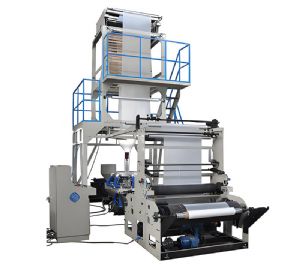
Blown Film Machine
Mechanical causes: the extruder screw may be surging due to feed problems – check that the hopper is not bridging (use a vibrator), that the gravimetric feeder is consistent, and that the screen pack is not clogged (high backpressure causes pressure fluctuations). If surging persists, clean the screw and barrel; worn screw flights can cause output variation. The haul-off speed might be unstable – check the nip roller pressure and drive encoder; if the nip slips, the speed fluctuates. Also, the bubble cage (stabilizing rings) should be positioned correctly – too tight restricts bubble, too loose allows oscillation. The internal air supply should have a regulator and a pressure gauge; ensure the pressure is steady – any pressure fluctuations from the compressor cause bubble size changes. Check for leaks in the air line. Another factor is the melt pump (if installed) – a faulty melt pump can cause pressure pulsations; check its gear alignment and motor drive. Finally, the resin itself may have inconsistent MFI or moisture – dry the resin if needed, and check that the blend ratio is stable. If all else fails, reduce the line speed temporarily to stabilize, then gradually increase while adjusting cooling.
Step-by-step procedure for fixing oscillation: 1) Reduce line speed by 20% to see if instability stops – if yes, cooling is insufficient; increase air flow or add IBC. 2) Check frost line height – if it is too high, increase cooling; if too low, reduce cooling. 3) Adjust internal pressure (if IBC or manual air) to center the bubble. 4) Check die temperature uniformity – adjust any cold or hot zones. 5) Clean the air ring and die lip thoroughly. 6) Inspect the screw – if surging, clean or replace screens. 7) Verify the nip roller pressure and alignment. 8) If using a melt pump, check its suction pressure. 9) Perform a trial with a different resin batch. 10) Document the stable settings for future reference. Remember that each line has its own characteristics; what works for one may not work for another. Regular maintenance (weekly cleaning of air ring, monthly die cleaning) prevents most instability. Also, train operators to recognize early signs of instability – a small wobble can escalate quickly. In summary, bubble instability is solvable by systematic diagnosis, focusing on cooling uniformity, melt flow consistency, and mechanical integrity. With practice, operators can quickly identify and fix the issue, minimizing downtime and scrap.
